Apple Stickies, Apple Notes, and Glassnote compared honestly. What each one does well, where each falls short, and which is right for you.
May 13, 2025 • Updated August 26, 2026 • Jake @ CaLab
Mac has had sticky notes since 2002. The built-in Stickies app still ships with every Mac. Apple Notes has taken over a lot of that space. And a few third-party apps have filled the gap for people who want something more visual.
Here is an honest comparison of the three options I actually recommend, depending on what you are trying to do.
Free. Built into macOS. No setup required.

Stickies is the obvious starting point. It floats on your desktop, it ships with every Mac, and it has been working the same way since OS X.
What it does well:
Where it falls short:
Best for: People who need a floating note right now and do not want to install or pay for anything.
Free. Syncs across all Apple devices via iCloud.

Notes is what most people actually use day-to-day. It is more of a proper notes app than a sticky notes tool — it lives in its own window and does not float on your desktop — but it covers more ground than Stickies for most workflows.
What it does well:
Where it falls short:
Best for: People who want notes synced across devices and do not need them floating on screen.
Paid, one-time purchase. Mac-only. Syncs between your Macs over your own iCloud Drive.
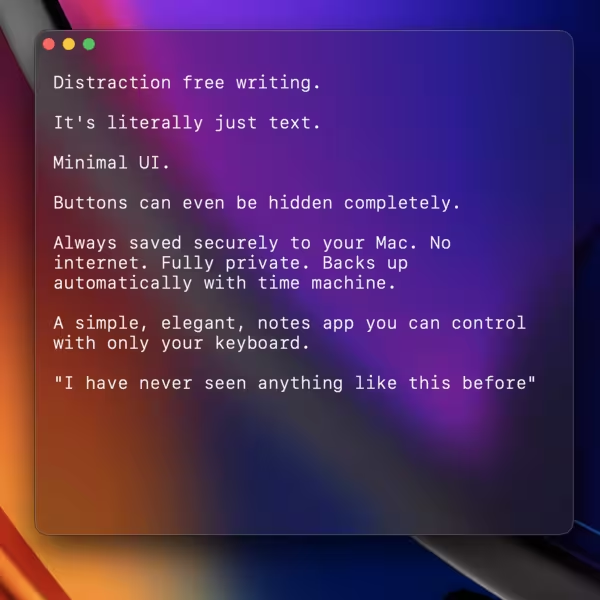
Glassnote takes the core idea of Stickies — floating notes on your desktop — and rebuilds it with a modern aesthetic. It is what I built after Stickies started feeling too dated on my setup.
What it does well:
Where it falls short:
Best for: People who live at a Mac desk and want floating notes that look good on a modern setup.
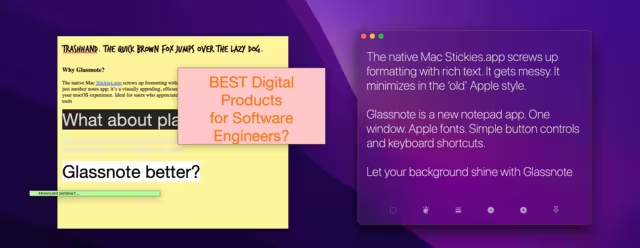
Apple Stickies (left) vs. Glassnote (right)
| Feature | Apple Stickies | Apple Notes | Glassnote |
|---|---|---|---|
| Floats over other apps | ✅ | ❌ | ✅ |
| Works on full-screen apps | ⚠️ Inconsistent | ❌ | ✅ |
| Transparency / glass look | ⚠️ 6 preset colors | ❌ | ✅ Vibrancy effect |
| Opacity slider | ❌ | ❌ | ❌ |
| Font flexibility | ✅ All system fonts | ⚠️ Limited | ⚠️ 4 preset styles |
| Checklists | ❌ | ✅ | ✅ via Markdown |
| Search across all notes | ❌ | ✅ | ✅ |
| Inline images | ✅ | ✅ | ❌ |
| Sync across devices | ❌ | ✅ Mac, iPhone, iPad | ⚠️ Mac to Mac |
| Export all your notes at once | ❌ | ⚠️ Per note or per folder | ✅ One JSON file |
| Modern visual design | ❌ | ✅ | ✅ |
| No account required | ✅ | ⚠️ Apple ID for sync | ⚠️ Apple ID for sync only |
| Price | Free | Free | Paid, one-time |
Glassnote does one job, so it stays small. Apple Notes is four times its size. Notion is eighty.
| App | Size on disk |
|---|---|
| Apple Stickies | 1.9 MB |
| Glassnote | 3.5 MB |
| Apple Notes | 15 MB |
| Notion | 290 MB |
Measured on macOS 26.6.2, September 2026. Stickies and Notes ship with macOS.
Use Apple Stickies if you want a floating note right now with no installation or cost. It works, it has always worked, and if you need access to a specific font it actually beats both alternatives.
Use Apple Notes if you need those notes on your iPhone and iPad too, and you do not need them floating on your desktop. Notes is a better notes app. It is not a sticky notes tool.
Use Glassnote if you work at a Mac all day, want notes visible while you do other things, and the twenty-year-old look of Stickies bothers you. The core workflow is the same but the execution is cleaner, the glass effect looks sharp on modern hardware, and the markdown and vim support make it more useful for technical notes. If you move between a desktop and a laptop, your notes follow you between them.

Does Apple Stickies have a transparent mode?
Yes. Open a note, go to the Color menu, and
pick one of the semi-transparent color options. The opacity is fixed per color with no slider to
adjust it.
Does Glassnote have a transparency slider?
No. You pick from three background modes:
Glass (macOS vibrancy blur), Dark Opaque, or Light Opaque. The glass mode looks significantly more
modern than Stickies' translucent colors but the level is not user-adjustable.
Can I use both Stickies and Glassnote at the same time?
Yes. They are separate apps and
do not conflict.
Do sticky notes sync between two Macs?
Apple Stickies does not sync. Apple Notes syncs
everywhere through iCloud. Glassnote syncs Mac to Mac through your own iCloud Drive, on by default,
with a local copy always kept on each machine. If you would rather it stayed off, switch Glassnote
off under System Settings → Apple Account → iCloud → Drive.
Is there a Glassnote app for iPhone?
Not yet. It is the next thing I'm building.
Is there a free trial for Glassnote?
Check the Glassnote
page for current pricing and trial options.
If you want sticky notes that look like they belong on a modern Mac, Glassnote is worth a look.
 Calcium Lab